TTRPG transcription
Transcribe tabletop RPG sessions on your own PC
A speech model on your computer turns the whole evening into a timestamped transcript. Nothing is uploaded, it keeps working offline, and there is no limit on how much you transcribe.


Free forever. No hours to count. Supports Windows 10 and 11 (64-bit).
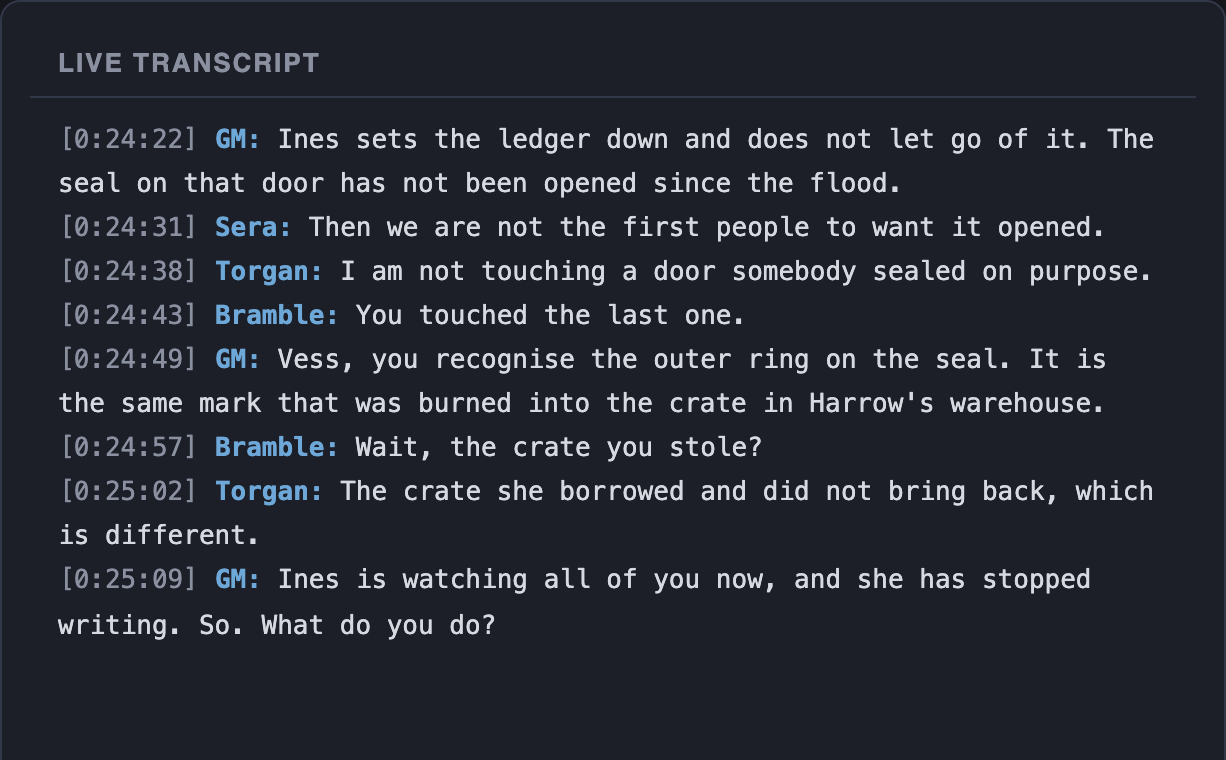
From the table to a transcript, without leaving your PC
- 01
Capture
Choose what to listen to: the call your PC is playing, a microphone in the room, or both mixed together.
- 02
Transcribe
The audio is transcribed in short pieces as you play, so lines appear during the session, each with its timestamp.
- 03
Keep the text
The transcript is written to a file in your LoreMonkey folder. The audio is discarded, unless you switch session recording on to keep an MP3.
The speech model is sized to your PC
LoreMonkey checks your hardware on first launch and downloads the largest model that will keep up with a live game. Larger models are better with fantasy names and mumbled table talk.
| Your graphics card | Speech model it runs |
|---|---|
| NVIDIA, 8 GB of memory or more | Whisper large-v3, full precision |
| NVIDIA, 5 GB or more | Whisper large-v3, compressed |
| NVIDIA, 3.5 GB or more | Whisper medium |
| NVIDIA, 2 GB or more | Whisper small |
| No NVIDIA card | Whisper base, on the processor |
Fantasy names are the hard part
No speech model has heard of your party's patron god, and it will misspell them. LoreMonkey handles that in three ways, all using the names already in your campaign notes.
- The transcript stays honest. The raw transcript keeps what was actually heard. It is evidence, so it is never rewritten.
- Everything written from it uses your spelling. Recaps, answers and search use the names from your notes, and a misheard name still finds the passages about the right person.
- A misheard name does not become a new NPC. When a name that is not in your notes sounds like exactly one that is, LoreMonkey catches it before it can be written into your campaign as someone new.
Spelled someone wrong from the start? Rename them once and every campaign file, recap and character tag follows.
Online or around a table
Online on Discord, each line gets the character name of whoever said it, with no bot in the call. How Discord transcription works
In person, record the room with one microphone. The transcript is complete, but not labelled by speaker.
The recordings you already have
A group that has played for a year before finding LoreMonkey usually has a folder of recordings and nothing made from them. Import them and each one is transcribed locally, for free, and filed as the session it was. The date is read from the file name or its metadata and shown to you to confirm, so six evenings imported at once do not all land on today.
Languages and game systems
Set the language your table speaks. LoreMonkey transcribes and searches in 24 languages: English, Swedish, Finnish, Norwegian, Danish, Icelandic, German, Dutch, French, Spanish, Portuguese, Italian, Polish, Czech, Slovak, Hungarian, Romanian, Turkish, Estonian, Latvian, Lithuanian, Greek, Russian, Ukrainian.
Any game works. Pick a common system or type your own: Dungeons & Dragons, Pathfinder, Call of Cthulhu, Cyberpunk RED, Vampire: The Masquerade, Delta Green, Blades in the Dark, Daggerheart.
 Transcription questions
The practical details
Is TTRPG transcription really free?
Yes, with no limit. The speech model runs on your own PC, so a four-hour session costs us nothing to transcribe and costs you nothing either. Plans pay only for the AI features.
Does it work offline?
Yes, once the speech model has downloaded. Recording, transcription and search all work without a connection. AI features such as recaps need one.
Do I need a graphics card?
No. Without an NVIDIA card LoreMonkey runs a smaller model on the processor. A card with more memory gets a larger model, which is faster and better with unusual names.
Can I transcribe sessions I recorded before?
Yes. Import MP3, M4A, WAV, FLAC, OGG, Opus, WebM and most video files. Each becomes a session filed under the date it was played, which you can correct before it is added.
Does it work for Pathfinder, Call of Cthulhu and other systems?
Yes. Transcription does not care what you play, and the campaign's game system is what prompts, recaps and answers follow.
Where do the transcripts go?
Into your LoreMonkey folder on your own disk, as files you can read, back up or delete. They are not uploaded.

Available now for Windows
Transcribe your next session
Download for Windows and transcribe as much as you play.